

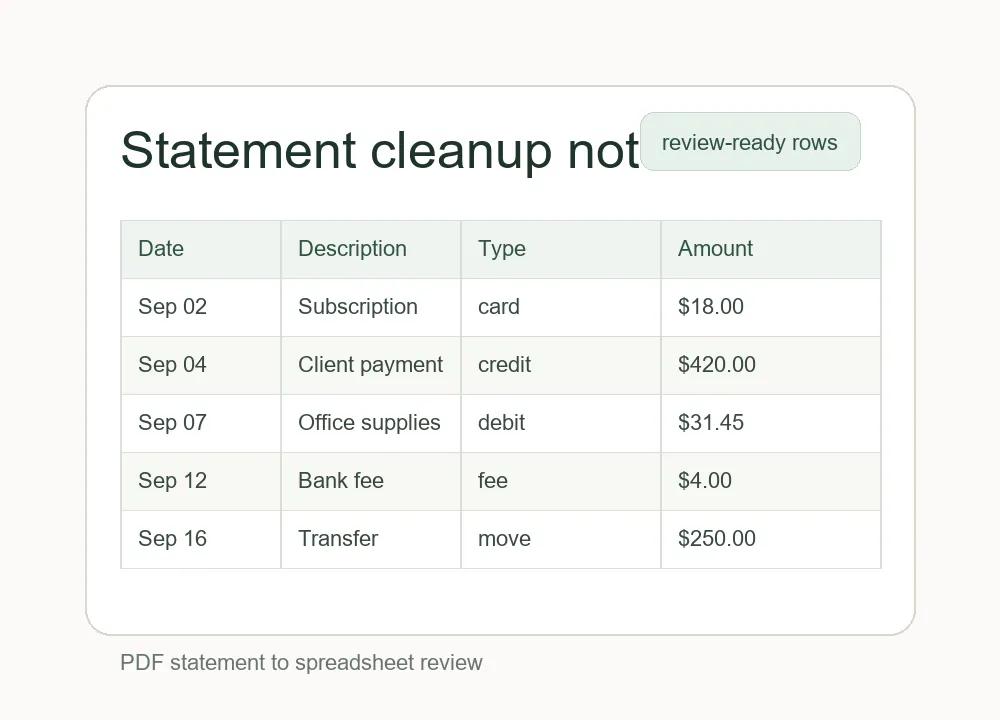
A monthly money review is easier when the raw statement is not the center of attention. Bank statements are good records, but they are usually designed for reading, not for analysis. Dates, merchant names, fees, transfers, and card payments may all be present, yet the format can make it hard to compare one month with the next. The useful work starts when the information is moved into rows that can be sorted, filtered, and checked calmly.
The first pass should be boring on purpose. I like to begin with four columns: date, description, amount, and type. That is enough to separate income, regular bills, card payments, transfers, and unusual items without turning the review into a full accounting project. If the statement comes from a PDF, this is the point where a tool such as a Bank Statement Converter can save time by turning the statement into spreadsheet-friendly data. The goal is not to automate judgment; it is to reduce the manual copying that often introduces mistakes.
After the rows are available, the next step is cleanup. Merchant names are rarely consistent. One subscription might appear with a location code in one month and a processor name in another. A coffee shop might show the store number first, while a delivery app might show the payment processor instead of the restaurant. Before making conclusions, it helps to normalize the descriptions just enough that similar transactions group together. This can be as simple as adding a clean name column beside the original description.
I would not delete the original statement text. The original description is useful when there is a dispute, a refund, or a transaction that needs to be traced later. A cleaned column should sit next to the source data, not replace it. That way the review remains readable while the raw record stays intact. This is especially important for freelancers, small business owners, or anyone sharing records with a bookkeeper.
Categories should also be simple at first. It is tempting to create a long list of labels, but too many categories make the review harder to maintain. A short set works better: income, housing, utilities, software, meals, travel, transfers, savings, taxes, fees, and review needed. The last category is underrated. If a transaction is unclear, marking it as review needed is better than forcing it into the wrong bucket just to finish the spreadsheet.
Recurring payments deserve their own pass. Sort by description or amount and look for charges that repeat monthly or yearly. This usually reveals the quiet leaks: a trial that became a paid subscription, a service that is still useful but overpriced, or a duplicate plan that started when a team changed tools. The point is not to cancel everything. The point is to notice what is happening before the spending becomes invisible.
Transfers need careful handling because they can make spending look larger than it really is. Moving money between checking, savings, cards, and payment apps may appear as both an outgoing and incoming transaction. If these are not labeled clearly, the monthly review can double-count activity. A simple transfer category prevents that confusion. It also makes the final summary more honest, because actual expenses are separated from movement between accounts.
Another useful habit is to add a note column for context. A note might say “client lunch,” “annual renewal,” “reimbursable,” or “ask about this.” Notes are most helpful when they are short and written close to the time of review. Waiting several months makes small transactions harder to remember, and vague descriptions rarely become clearer with time.
For small business records, cleanup should happen before reconciliation. A bank balance can match while the underlying categories are still messy. Reconciliation confirms that the statement and ledger agree; cleanup makes the ledger understandable. Doing the cleanup first helps avoid a common problem: technically balanced records that still do not explain what happened during the month.
Privacy matters as well. Statement data can include names, account fragments, locations, and spending patterns. If a spreadsheet will be shared, remove anything that is not needed for the review. Keep a private original, work from a cleaned copy, and avoid sending full statements when a summarized table is enough. A calmer workflow is not only about convenience; it is also about reducing unnecessary exposure.
The final review can be short. Look at total income, total expenses, unusual charges, recurring payments, fees, and items marked for follow-up. Then write a few plain notes about what changed from last month. Did a yearly renewal hit? Did travel spending return? Did software costs creep upward? These observations are more useful than a complicated dashboard that nobody wants to maintain.
A good statement workflow does not need to be fancy. It needs to be repeatable. Convert the record into rows, keep the source text, normalize the obvious names, label transfers carefully, and leave a trail of notes. That turns a pile of statement pages into something that can support better decisions without making the monthly review feel like a second job.